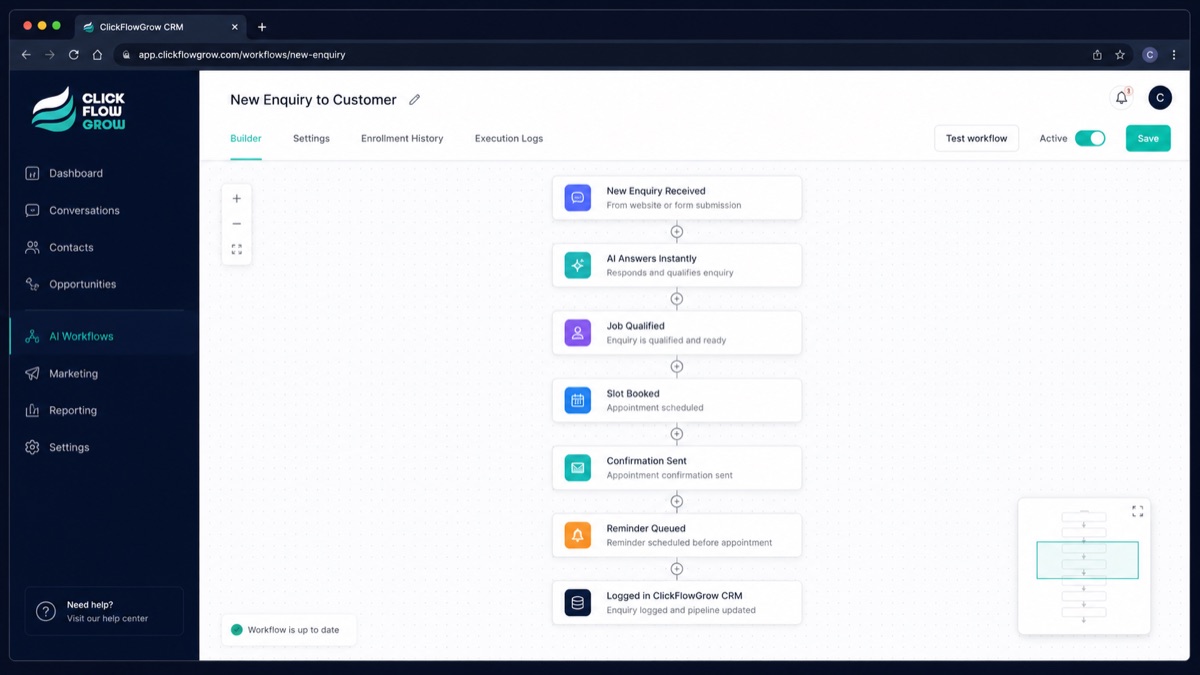
A connected business system feels calm and uneventful: an enquiry is recorded once, a booking appears in the right calendar, appropriate follow-up happens, the team can see the context and exceptions reach a person. The aim is not to remove people; it is to reduce avoidable chasing, copying and uncertainty.
Businesses rarely set out to build a maze of disconnected tools. It happens gradually. A website is added, then a booking calendar, a shared inbox, a CRM and a few automations. Each tool may work perfectly well on its own while the people using them still have to carry information from one place to another.
A genuinely connected system is easier to recognise through the experience it creates. Customers are not asked to repeat themselves. The team can see what happened. Routine steps do not depend on somebody remembering them, and responsibility remains clear when judgement is needed.
Connection begins with one real business moment
Start with an event the business already needs to handle: a new enquiry, a call, a booking, a quote request or an existing customer asking for help. That event should create one reliable trail from the customer's action to the business's response.
The useful question is not “How many tools can we connect?” It is “What must remain true as this customer moment moves forward?” Usually that includes the original request, the chosen contact route, consent, timing, ownership and the next promised action.
The website hands over intent, not only contact details
A form submission is more useful when the business can see what the person was trying to do. The source page, selected service and original message may matter just as much as a name and email address.
A connected handover keeps that intent with the contact record. It avoids the familiar follow-up question—“What was this about?”—when the customer has already explained it.
The CRM becomes shared memory
A CRM is valuable when it gives the people responsible for the relationship a dependable place to understand it. That may include the enquiry, relevant conversations, appointments, notes, tasks and the current owner.
It should not become a second job layered on top of the work. Capture what helps the next decision, keep the record understandable and avoid collecting fields simply because they are available.
Booking and follow-up make the next step visible
When someone books, the customer should receive a truthful confirmation and the appointment should appear where the responsible person expects it. Any reminder or preparation message should match the actual appointment and the permission the customer has given.
Good follow-up sounds like the business because it uses approved language and relevant context. Automation can deliver it consistently, but the business remains accountable for what is promised.
Automation carries the routine work—and respects the boundary
Useful automation moves information, creates a task, sends an agreed acknowledgement or reminds someone about a next action. It should make ownership clearer, not conceal it.
Exceptions still need a route. A complaint, sensitive circumstance, unusual request or decision outside the agreed rules should reach a person with enough context to take over responsibly.
The team can see the whole picture
A connected process reduces the need to hunt through several inboxes, calendars and private notes. It does not mean every colleague sees every piece of information. Access should still match the person's role and the customer's reasonable expectations.
The practical benefit is shared clarity: who contacted the business, why, what has already happened and who owns the next action.
What do disconnected systems feel like?
- The same customer information is copied into several tools.
- A booking exists, but the enquiry that led to it is difficult to find.
- Follow-up depends on one person remembering a manual step.
- Customers repeat details when a conversation changes channel or owner.
- The team cannot tell whether somebody else has already responded.
- Automated messages continue after the situation has changed.
Does everything have to be in one platform?
No. A connected system may use one platform or several appropriate tools. What matters is whether the important information and responsibilities move safely between them.
Fewer tools can reduce complexity, but replacing working software is not automatically the right answer. First identify the break in the customer or operational journey. Then decide whether clearer use, a suitable integration or a replacement is justified.
What should a business connect first?
Choose one frequent journey where lost context or manual chasing creates a real cost. A new enquiry is often a useful starting point because it touches the website, communication, CRM, ownership and follow-up.
- Write down the event that starts the journey.
- List the information the next person genuinely needs.
- Name the owner of each important action.
- Mark which routine steps can be automated safely.
- Define the exceptions that must reach a person.
- Test the full journey as a customer and as the responsible team member.
The result should feel less like a technical project and more like a clearer way of working. That is the practical meaning of a connected business system.